Unable to open this exercise
A flowchart represents an algorithm using shapes and directional arrows. An oval marks start/end, a rectangle marks a process such as assignment, a parallelogram marks input/output, and a diamond marks a decision. Label the decision branches Yes/No or True/False. Arrows show execution order and can return to an earlier step for a loop.
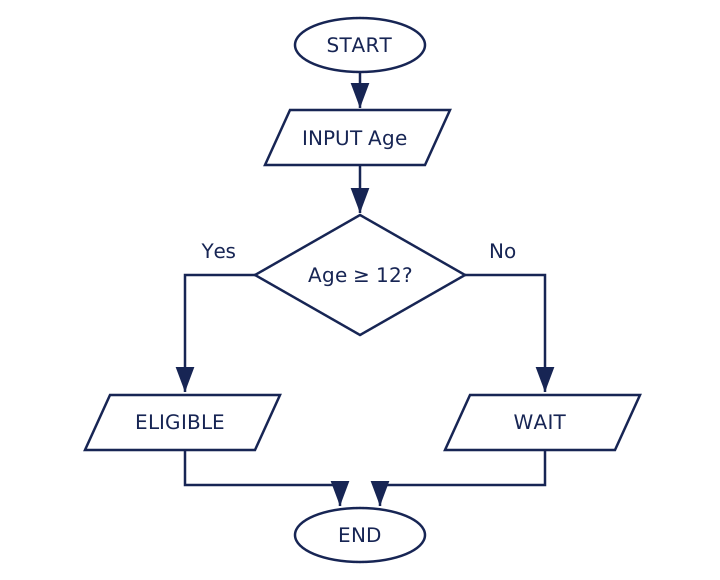
Worked trace
For Age=11, the condition is false and the output is WAIT. For Age=12, it is true and the output is ELIGIBLE. Both branches reach End. Replacing >= with > would wrongly reject the boundary value 12.
Amend and construct
On paper amend the chart so eligibility begins at 15. Only the comparison threshold needs changing. Then draw a new chart which repeatedly asks for a value until it lies from 1 to 5 inclusive.
Self-review: Start leads to an input parallelogram; a decision tests Value >= 1 AND Value <= 5; No returns to input, and Yes reaches a success output and End. Returning to the decision without another input would repeat the same invalid value forever. Use the correct shapes, labelled branches and arrowheads.
AI Socratic Tutor
Need guidance? Ask a question or use the hint below.
AI Socratic Tutor is an All-Access Benefit
Unlock step-by-step Socratic hints, algorithm trace table walkthroughs, and error diagnostics for every Cambridge exercise.
You're chatting with an AI tutor, not a person. AI can make mistakes, so double-check its answers.
Application: Trace a decision
A flowchart inputs Age, tests Age >= 12 and outputs ELIGIBLE on yes or WAIT on no.
- Output for Age 11: [Space 1]
- Output for Age 12: [Space 2]
- Shape for the decision: [Space 3]
Interactive exercises for Module 2 and beyond require an active plan.